Back to Writing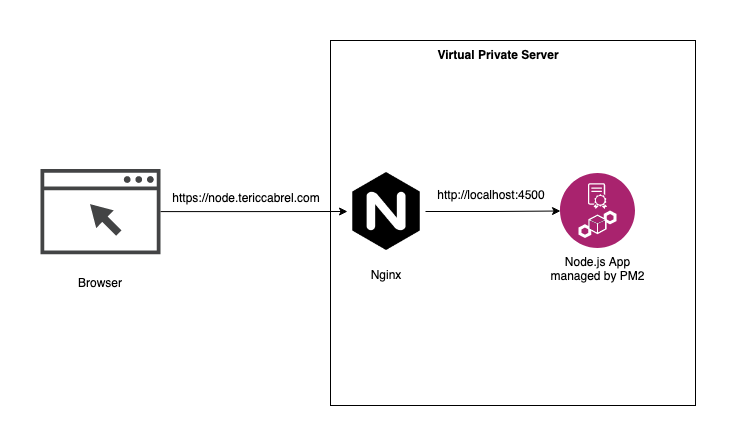
Essay
Deploying a Node.js App on AWS EC2 with PM2 and Nginx
A comprehensive guide to deploying Node.js applications on AWS EC2 using PM2 for process management and Nginx as a reverse proxy.
December 19, 20244 min readNode.jsAWSEC2
Introduction
AWS EC2 provides a scalable environment to host applications. PM2 is a production process manager for Node.js, and Nginx acts as a reverse proxy to handle requests efficiently. In this tutorial, we'll deploy a Node.js application on EC2 using PM2 and Nginx.
Prerequisites
You'll need:
- An AWS EC2 instance (Ubuntu recommended)
- Node.js & npm installed
- PM2 installed globally (
npm install pm2 -g) - Nginx installed
- A domain name pointed to your EC2 instance
Step 1: Set Up Your EC2 Instance
Launch an EC2 Instance
- Go to AWS Console → EC2 → Launch Instance
- Choose Ubuntu Server 22.04 LTS
- Select your preferred instance type (t2.micro for testing)
- Configure security groups to allow:
- SSH (port 22)
- HTTP (port 80)
- HTTPS (port 443)
Connect to Your Instance
ssh -i your-key.pem ubuntu@your-ec2-public-ip
Step 2: Install Required Software
Update System and Install Node.js
sudo apt update && sudo apt upgrade -y
curl -fsSL https://deb.nodesource.com/setup_18.x | sudo -E bash -
sudo apt-get install -y nodejs
Install PM2 and Nginx
sudo npm install pm2 -g
sudo apt install nginx -y
Verify Installations
node --version
npm --version
pm2 --version
nginx -v
Step 3: Upload Your Node.js App
Clone Your Repository
cd /var/www
sudo git clone https://github.com/username/project.git
sudo chown -R ubuntu:ubuntu project
cd project
npm install
Create PM2 Ecosystem File
Create ecosystem.config.js:
module.exports = {
  apps: [{
    name: 'your-app-name',
    script: 'server.js',
    instances: 'max',
    exec_mode: 'cluster',
    env: {
      NODE_ENV: 'production',
      PORT: 3000
    },
    error_file: './logs/err.log',
    out_file: './logs/out.log',
    log_file: './logs/combined.log',
    time: true
  }]
}
Step 4: Start with PM2
Start Your Application
pm2 start ecosystem.config.js
pm2 startup
pm2 save
PM2 Useful Commands
pm2 list                    # List all processes
pm2 restart your-app-name   # Restart specific app
pm2 stop your-app-name      # Stop specific app
pm2 logs your-app-name      # View logs
pm2 monit                   # Monitor dashboard
Step 5: Configure Nginx
Create Nginx Configuration
Edit the Nginx config:
sudo nano /etc/nginx/sites-available/your-app
Add this configuration:
server {
    listen 80;
    server_name your-domain.com www.your-domain.com;

    location / {
        proxy_pass http://localhost:3000;
        proxy_http_version 1.1;
        proxy_set_header Upgrade $http_upgrade;
        proxy_set_header Connection 'upgrade';
        proxy_set_header Host $host;
        proxy_set_header X-Real-IP $remote_addr;
        proxy_set_header X-Forwarded-For $proxy_add_x_forwarded_for;
        proxy_set_header X-Forwarded-Proto $scheme;
        proxy_cache_bypass $http_upgrade;
    }

    # Gzip compression
    gzip on;
    gzip_vary on;
    gzip_min_length 1024;
    gzip_types text/plain text/css text/xml text/javascript application/javascript application/xml+rss application/json;
}
Enable the Site
sudo ln -s /etc/nginx/sites-available/your-app /etc/nginx/sites-enabled/
sudo rm /etc/nginx/sites-enabled/default
sudo nginx -t
sudo systemctl restart nginx
Step 6: Set Up SSL (Optional but Recommended)
Install Certbot
sudo apt install certbot python3-certbot-nginx -y
sudo certbot --nginx -d your-domain.com -d www.your-domain.com
Step 7: Monitoring and Maintenance
Set Up PM2 Monitoring
pm2 install pm2-server-monit
pm2 install pm2-logrotate
Create Log Rotation
pm2 set pm2-logrotate:max_size 10M
pm2 set pm2-logrotate:retain 30
Benefits
- Zero downtime with PM2 restarts and clustering
- Nginx as reverse proxy for better performance and caching
- Easy scalability by adding more EC2 instances
- Process management with automatic restarts
- Load balancing capabilities
- Professional monitoring and logging
Troubleshooting
PM2 Issues
pm2 logs --lines 100
pm2 restart all
pm2 delete all && pm2 start ecosystem.config.js
Nginx Issues
sudo nginx -t
sudo systemctl status nginx
sudo tail -f /var/log/nginx/error.log
Port Conflicts
Check if port 3000 is available:
sudo netstat -tlnp | grep :3000
Conclusion
This setup is production-ready and can be scaled horizontally by adding more EC2 instances and load balancing. PM2 ensures your application stays running, while Nginx handles incoming requests efficiently.
Happy deploying! 🚀